Bambu Lab printers have a camera inside. You can watch it from the phone app, Bambu Handy, or from Bambu Studio, the slicer (where you set up a print and send it). But just having the entire slicer application up on my desktop, just so I could watch what was printing in real time, seemed like a lot. And so I wondered, can I just get the webcam and maybe some basic control features and just use that instead? And that was the idea.
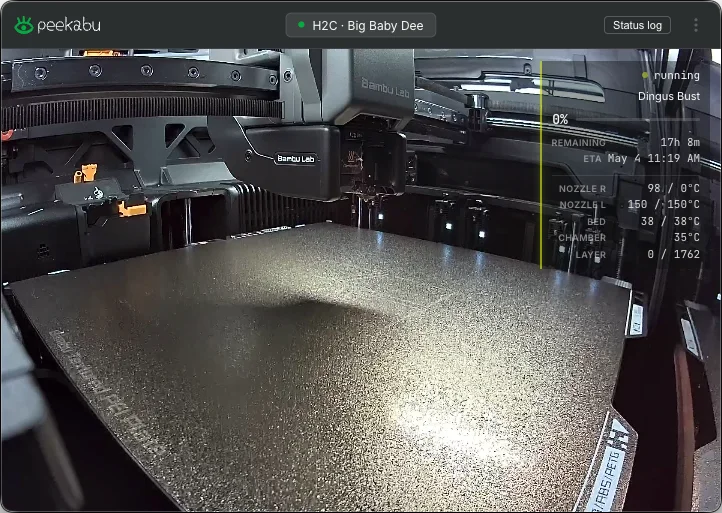
Peekabu is a small window with the live camera and the print’s progress, time left and temperatures laid over it, plus a percent up in the menu bar. I use it as the window. The menu bar icon was added because I thought that was a good thing to have, especially if I dismissed the window for any reason. Or because sometimes I have lots of windows up. So just being able to keep progress at a glance was something I wanted to be able to do, as well as being able to actually watch the stream as it’s going.
The camera was the hard part. The printer sends H.264 video and the player inside the app can only draw MPEG-1, a format from 1993, so until Peekabu converted one into the other, the camera view was just blank white frames with no error. The converting is done by ffmpeg, which you install yourself.
The printer in the screenshot is my H2C. I needed to come up with a name for a printer, and Big Baby Dee popped in my head. For whatever reason, I was thinking of the movie Next Friday and Mike Epps going on about Baby D and that whole scene where he’s talking about how afraid of her he is. And I guess the H2C is a big printer, and it stuck. It’s printing the Dingus Bust. I had modeled a bust of my own head to give as gag gifts to my team in the office at work, and my mother.
What it shows
- The live camera, straight from the printer over your own network, no cloud in between
- Progress, time left and the clock time it’ll finish, layer count, and nozzle, bed and chamber temperatures
- The print percent in the menu bar while something’s printing
- Mac notifications when a print finishes, fails or pauses on an error, plus a few of Bambu’s HMS alerts (the printer’s own error codes)
- A status log for each printer, which you can export
- More than one printer, with a switcher
Not a remote
There’s no pause, resume or stop. Bambu printers won’t take commands from another app over your network unless you switch on Developer Mode, which turns off the cloud and the phone app. There’s still plenty of things to improve. I have two printers, and the code can already handle more than one, but different views to watch multiple printers at a time might be interesting to try to accomplish. Adding more control features is something that would be worthwhile. That’s if I decide to come back to it.
Requirements
- An Apple Silicon Mac (one with an M-series chip) on macOS 12 Monterey or later
- ffmpeg for the camera:
brew install ffmpeg. Without it everything but the camera works. - A Bambu Lab X1 or H2 series printer (tested on an X1C and an H2C)
- The printer’s IP address, serial number and access code, all on its Settings, Network screen
- LAN Only Liveview switched on in the printer’s settings
That last toggle sounds like LAN-only mode, and it isn’t. Your printer stays on the cloud and Handy keeps working. It just also lets your local network see the camera.
Get the .dmg
Version 1.0.0 is the first public release. Grab the .dmg from the releases page, drag Peekabu to Applications, launch. It checks for updates on its own and installs them when you quit.
Closed-source freeware, meaning it’s free but the code isn’t public. Free for personal, non-commercial use. You can pass around the unmodified bundle.